Early Warning Scan
Catch a reputational problem while it is still a faint signal, not a headline. The Early Warning Scan reads your recent coverage and flags the candidates worth investigating now, before they harden into a full issue.
What it does
Most issues announce themselves only once they are already loud. This scan looks earlier, at the quiet moments where intensity is rising even though volume has not. It compares your most recent window of coverage against the seven days immediately before it, then tests for the patterns that tend to precede a real problem: negative coverage reaching top-tier outlets, new critical voices appearing, social engagement spiking on negative items, and a single framing spreading across many separate outlets at once. The output is calibrated to catch genuine emergence without firing on every passing news ripple, because a scan that cries wolf is a scan nobody reads.
The questions it answers
- Is the tone of our coverage sharpening even while the volume stays flat, the classic early-warning signature?
- Has any negative story landed in a major, high-reach outlet rather than staying in the margins?
- Are new journalists, critics, activist groups, or regulators suddenly appearing in coverage about us?
- Is the same negative phrase showing up across many different outlets, suggesting a narrative is converging rather than sitting in one place?
- Which of these signals actually deserves attention right now, and which are noise?
What's in the report
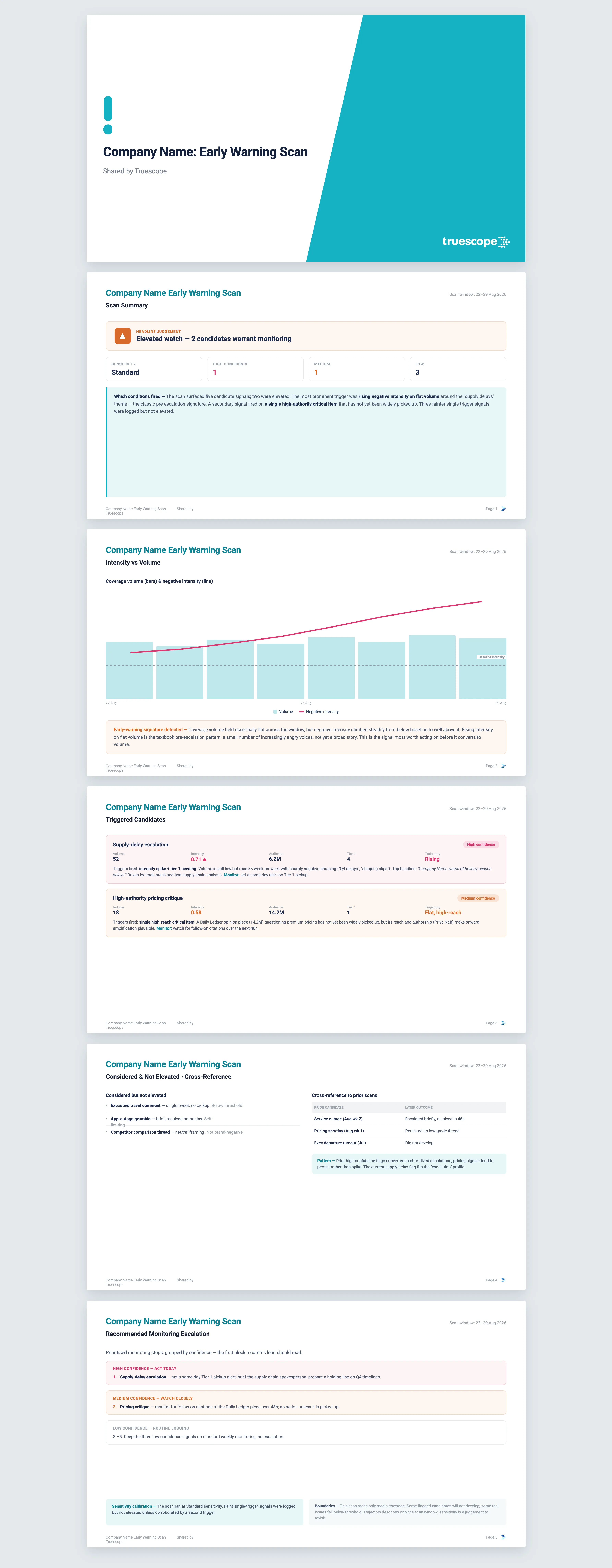
The scan opens with a summary panel: the window it covered, the sensitivity setting in use, how many candidates triggered at each confidence level, and a single plain-language judgement on whether anything needs review now.
- An intensity-versus-volume chart that shows whether negative tone is rising independently of volume, with your prior-period average marked as a baseline reference.
- A profile of each triggered candidate: what it is about in plain language, the triggers that fired, a confidence rating, its trajectory, and the top three headlines driving it.
- The specific voices behind each candidate, named journalists, outlets, and critics, with a phrase on the role each is playing.
- A list of signals the scan inspected but chose not to elevate, with the reason for each, so you can see the judgement, not just the conclusion.
- A consolidated monitoring view grouped by confidence, the single block a comms lead reads first.
Every candidate is benchmarked against the prior seven days, and every finding is cited back to the source coverage so you can open the articles yourself.
Who it's for
This is built for communications and corporate affairs teams who own reputational risk and cannot afford to learn about an issue from the morning papers. It suits in-house comms leads running a watching brief on a brand, agency teams monitoring a client, and government and public-sector communicators who need an early read before a story reaches ministers or the board.
Why Truescope Analyst
The traditional version of this is a person scrolling clippings at 7am, trusting instinct to decide what feels like it is building. That works until the analyst is on leave, or the signal hides in a regional outlet nobody checks, or the rise in tone is too gradual to notice day by day. General AI tools cannot help here at all, because they have no view of your coverage; they can summarise an article you paste in, but they cannot compare this week's negative phrasing against last week's across every outlet you track. Analyst reasons across your full media dataset, applies the same trigger logic every time so the read is consistent rather than mood-dependent, cites each candidate back to real coverage, and runs in minutes. It is part of your Truescope subscription, so anyone on the team can run a scan without waiting for the one person who usually does it.
Frequently asked questions
How far back can the scan look?
The scan window itself is deliberately short, because beyond about a week it stops being early warning and becomes ordinary monitoring. It draws on up to the last 13 months of coverage in your Truescope inbox, or the last 90 days for global data not already matched to your workspace, and always compares your recent window against the seven days immediately before it.
What does the sensitivity setting actually change?
Sensitivity controls how faint a signal can be and still get flagged. High surfaces more candidates including weak ones, low flags only strong signals, and medium is the balanced default. Whatever you choose, the scan still lists the faint signals it inspected but did not elevate, so nothing is hidden from you.
Will it tell me what to do about a flagged issue?
No, and that is deliberate. The scan stays in the analyst's lane: it recommends monitoring steps such as setting up a dedicated scan or alerting the comms lead. Decisions about press statements or executive outreach need legal and operational context the scan does not have.