This template is one of 70+ report templates that is available in Truescope Analyst, your AI media analyst teammate. Book a demo to use this template or to create your own reusable template.
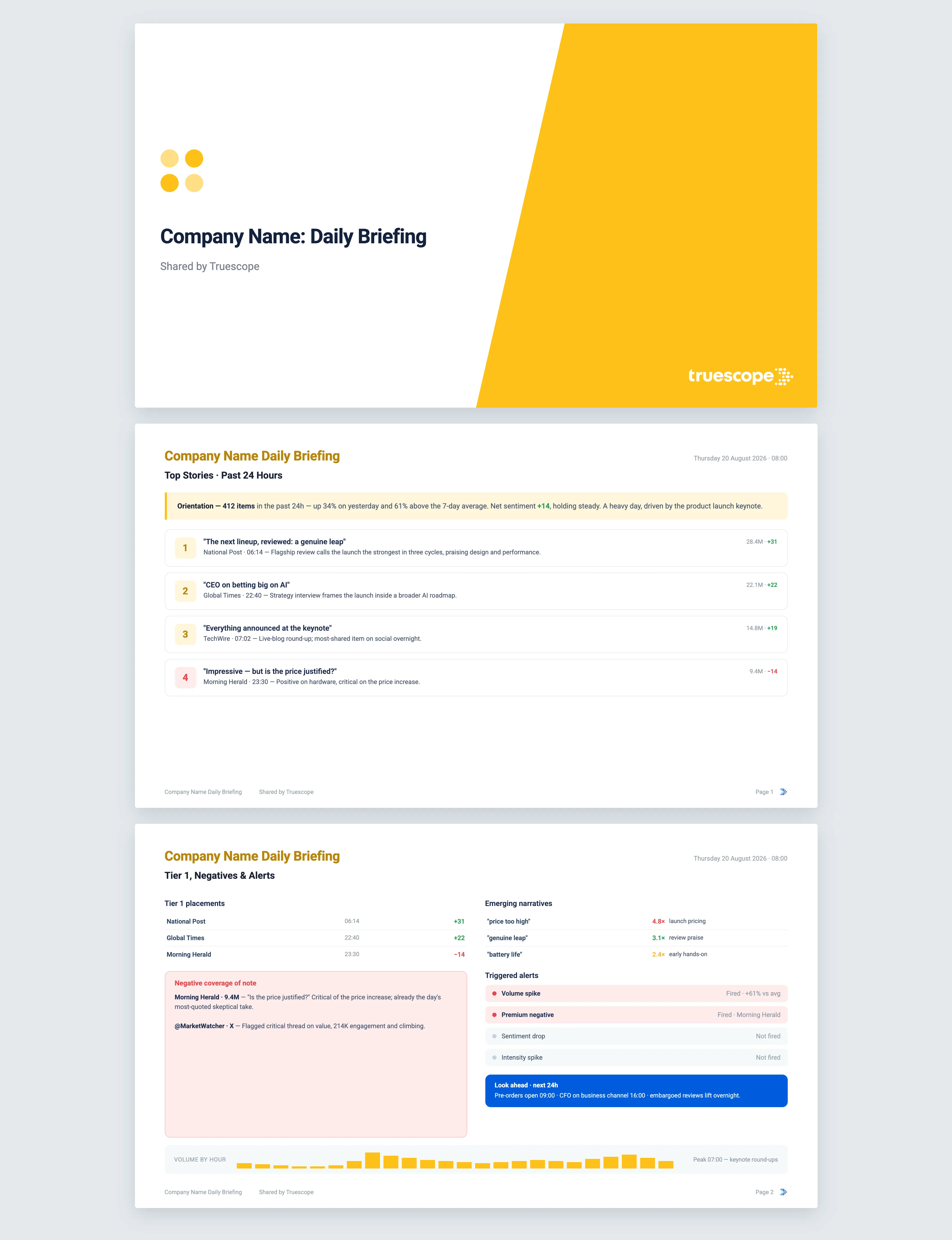
Your media morning, read in 60 seconds. The Daily Briefing tells you what happened in the last 24 hours, what is moving now, and what you may need to respond to before lunch.
What it does
The Daily Briefing is journalism, not analysis. It scans the last 24 hours of coverage in your Truescope inbox and surfaces the handful of things that actually matter today: the biggest stories, the placements in premium outlets, any negative coverage worth knowing about, and narratives that are starting to build. It deliberately avoids trend interpretation. A single day is too short a window to call a trend, so the briefing reports what is in front of you and leaves the judgement to you.
The questions it answers
- What were the most-read stories about us in the last 24 hours, and were they positive or negative?
- Did anything land in a top-tier outlet overnight that I need to be across?
- Is there negative coverage reaching a large audience or appearing in a major masthead?
- Which phrases or talking points are suddenly surging compared with the past week?
- Is today a normal day, a heavy one, or unusually quiet?
What's in the report
The briefing fits on roughly one screen and is built to be scanned, not studied. It opens with an orientation line: today's volume against yesterday and against the seven-day average, with sentiment direction noted as steady, intensifying or muted.
From there you get:
- Top stories, the three to five highest-reach items of the day, each with a one-line summary and a sentiment marker.
- Tier 1 placements, every story that landed in a premium outlet overnight, listed individually so none gets lost in the noise.
- Negative coverage of note, any negative item that reached a large audience or appeared in a major outlet, plus anything matching the names or terms you have asked us to watch.
- Emerging narratives, phrases that surged today against their seven-day baseline, with a line of context on what is driving them.
- New journalists or sources covering you for the first time in a month, or covering you far more than usual.
- A volume-by-hour chart showing when coverage peaked, with the peak attributed to the story behind it.
- Triggered alerts, a short list of automatic flags such as a volume spike, a sentiment drop, or negative coverage in a premium outlet.
If you have shared events expected in the next 24 hours, a brief look-ahead is added. Every story in the briefing links back to the original coverage, so anything you act on is traceable to source.
Who it's for
The Daily Briefing is for comms and PR teams who start the day needing to know where things stand, fast. It suits a head of communications scanning for overnight risk before a morning stand-up, a press officer deciding what to flag to leadership, and anyone who has to walk into a 9am meeting already across the news.
How to use this template
This template runs inside Truescope Analyst, the AI media analyst in the Truescope platform. Point it at your own coverage, set the window, and Analyst returns the full report with every claim cited to source. You can also save your own analysis as a reusable template and run it on a schedule. Book a demo and we will run this one on your coverage.
Why Truescope Analyst
The traditional morning scan means a press officer in early, reading clippings, checking a few outlets, and hoping nothing slipped through before the first meeting. It is slow, it is patchy, and it depends entirely on who is rostered on. A general AI chatbot cannot help here at all, because it has no sight of your overnight coverage and will happily summarise stories that do not exist.
Analyst reads across your entire inbox the moment you ask, picks out the high-reach stories, the premium placements and the negative items above threshold, and ranks them the way an experienced press officer would. The narratives it flags as emerging are measured against a real seven-day baseline, not guessed at. Every item is cited back to the coverage it came from, and the briefing is ready in minutes rather than after an hour of manual reading. It is part of your Truescope subscription, so anyone on the team can run it.
Frequently asked questions
What time period does the briefing cover?
The Daily Briefing always looks at the last 24 hours of coverage in your Truescope inbox, compared against a rolling seven-day average so you can see whether today is heavier or lighter than usual. Analyst can read up to the last 13 months of coverage in your inbox, or the last 90 days of global data not already matched to your workspace, but for a daily briefing the 24-hour window is the point.
Can I flag specific names or topics to watch?
Yes. If you supply high-priority names or terms, any negative coverage mentioning them in the last 24 hours is pulled into the briefing regardless of audience size, so a small but sensitive story does not slip past.
Why doesn't the briefing tell me whether something is a trend?
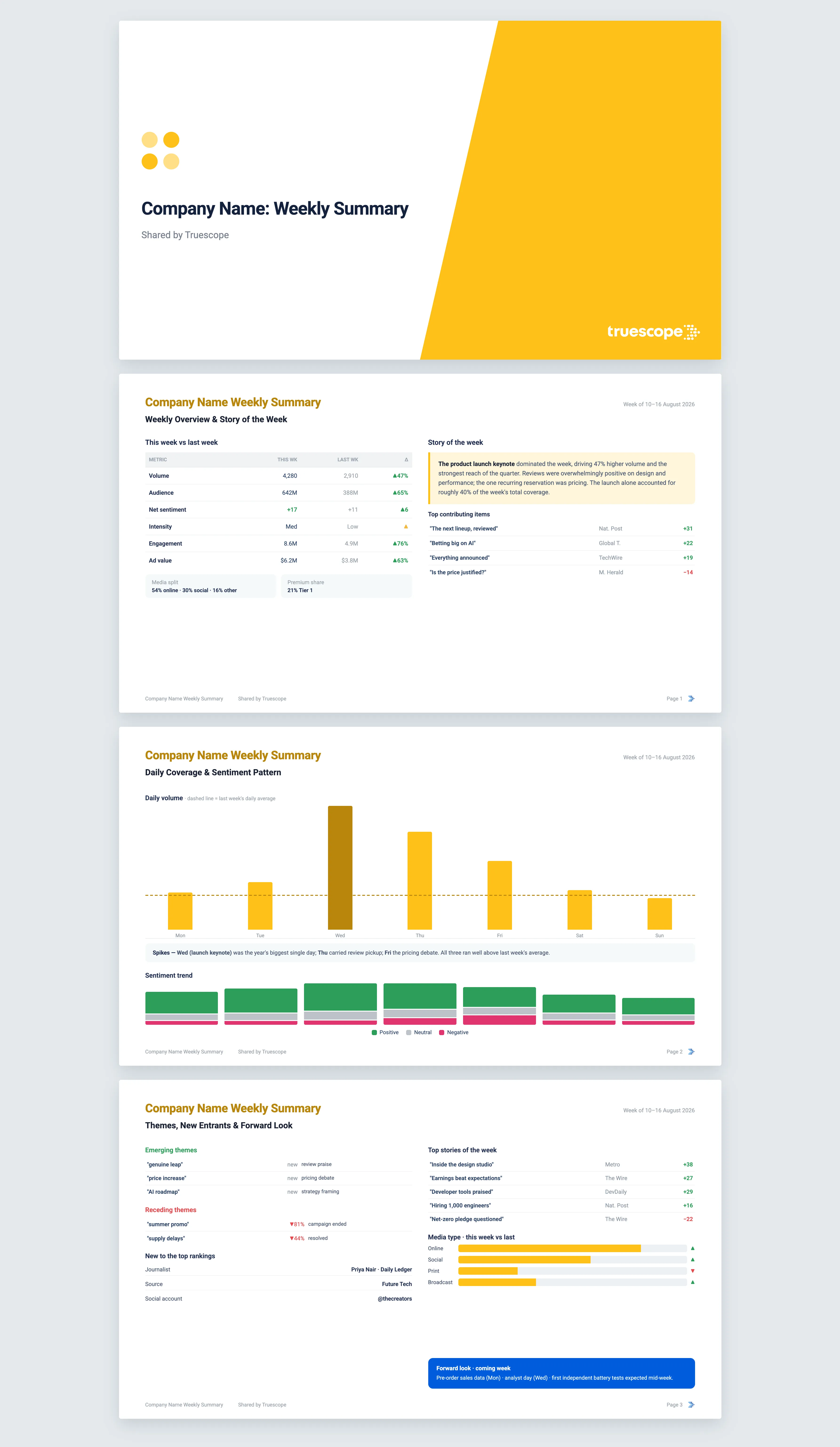
A single day is too short a window to separate a one-off news cycle from the start of a sustained trend. The Daily Briefing reports sentiment story by story and leaves trend interpretation to the Weekly Summary and Monthly Report, where the sample is large enough to support it.
See how you can get more signals and insights from your media intelligence platform
See how you can get more signals and insights from your media intelligence platform


.svg)